Products

Eight parts. Same tickets, same menu, same reports.

Split by who touches it — cashier, waiter, cook, manager, guest — not by a different database for each. If a number disagrees between the till and the Owner Day report, that is a bug, not a “sync later” feature.

Windows PC or tablet, Android tablet, iPad · Basic plan and up

Cashier

Counter checkout for dine-in, takeaway and delivery.

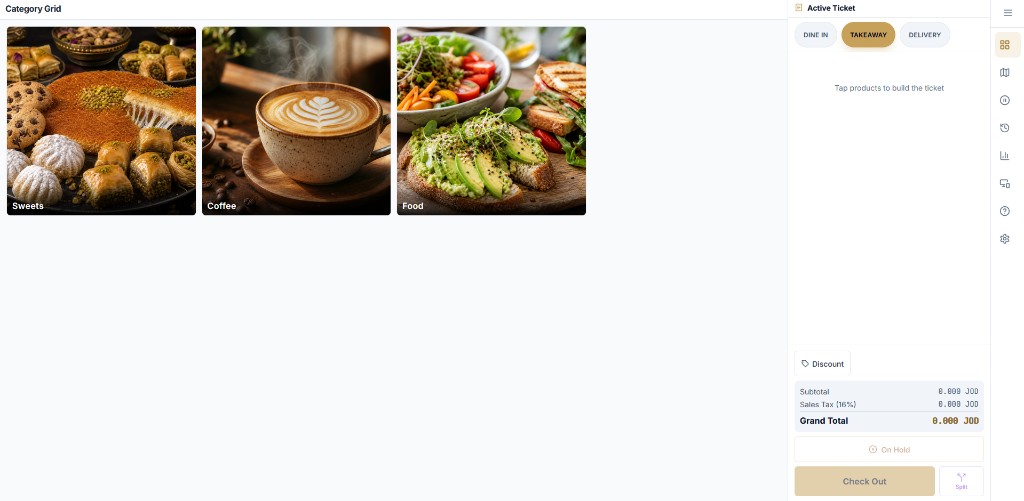
The cashier app is what your staff touch all day, so it is built around a category grid, a live ticket and a small number of large buttons. New staff learn it in a shift.

  • Category grid with photos, sub-items and modifiers
  • Dine-in, takeaway and delivery on the same ticket screen, with channel-specific prices
  • Hold a ticket and come back to it; split a ticket between guests
  • Line and ticket discounts
All Cashier features
Ena Cashier app showing a category grid and an active ticket

Android and iOS phones or small tablets · Basic plan and up

Waiter

Tableside ordering on a phone, fired straight to the kitchen.

Waiters open a table, take the order and fire it to the kitchen without walking to the counter. The table map is the same one you draw in Floor Studio, so what the waiter sees matches the room.

  • Table map with open, occupied and needs-attention states
  • Open a table and take the order item by item
  • Fire items to the kitchen as the table is ready for them, so mains do not arrive with starters
  • Add notes and modifiers per item (no onion, extra sauce, well done)
All Waiter features

WAITER · FLOOR

T-01

OPEN

T-04

OCCUPIED

T-07

OPEN

T-09

OPEN

FIRE TO KDS

Any tablet, TV or PC with a browser; Android tablets · Basic plan and up

Kitchen display

Wave-based kitchen board with ETAs instead of a pile of paper tickets.

The kitchen display groups items into preparation waves and shows a countdown per order. A cook taps an item when it is started and again when it is ready; the expo sees the whole order come together.

  • Orders grouped by wave with a max-prep timer and ETA
  • Tap an item to start it, tap again when it is ready; the order clears when everything is done
  • Channel tags: dine-in, takeaway, QR, Talabat, Careem and the other connectors
  • All-branches view for a central kitchen or a manager screen
All Kitchen display features
Ena

Wave kitchen

Downtown Amman7233

05:14:35 PM
Active 3
Take Away

#890-522A53D7

ETA

07:59

  • 3×Cheese Kunafa

    8M

    Start preparation

  • 1×Milk Cookies

    3M

    Waiting

Max prep 8M · Waves 2
Talabat

#809-482454CB

ETA

06:59

  • 2×Avocado Sourdough

    7M

    Waiting

Max prep 7M · Waves 2 · Commission 25%
Dine In

#993-1ED550C2

ETA

09:59

  • 1×Flat White

    4M

    Start preparation

    No foam

  • 1×Sandwiches

    10M

    Waiting

Max prep 10M · Waves 2

Any browser at app.enapos.com · Basic plan and up

Command Center

The web back office: menu, orders, reports, staff, devices and settings.

The Command Center is where an owner or manager runs the business. It is a website, not an app you install, and it works on a laptop or a phone.

  • Categories, items, sub-items and modifiers with photos
  • Channel prices: charge a different price on delivery apps than at the counter
  • Bulk upload and update from a spreadsheet
  • Sold-out and hidden states that apply everywhere at once
All Command Center features
dashboard.ena.pos · Executive Home

Executive Home

Active Tables

8

Open Tickets

16

KDS Avg Prep

12 min

Live Gross Sales

119.300

Sales Velocity

Dine in vs delivery · last 7 days

Dine In Delivery

Multi Channel Split

Live gross sales distribution

72%
In Store 72%Talabat 18%Careem 10%

Guest phones, no app download · Pro plan and up

QR menu & order tracking

A branded menu on the guest's phone, plus a live order-status page.

Each store gets a public menu at its own address on app.enapos.com. Print the QR on table tents or the door; guests browse the live menu with photos, prices in JOD and sold-out badges that update the moment you change them.

  • Live menu with photos, descriptions, modifiers and channel pricing
  • Sold-out and hidden items update instantly from the Command Center
  • English and Arabic switch for guests
All QR menu & order tracking features

Noor Café · QR Menu

Table 08

Signature Burger6.500
Extra CheeseNo OnionWell Done
Iced Latte2.750
Kunafa Dessert4.250
Sold Out
Add to Order · No App Needed

Command Center (web) · Pro plan and up

Inventory & procurement

Recipes that deduct on every sale, stocktakes, suppliers and purchase orders.

Attach a recipe to a menu item and stock is deducted when it sells — at the counter, on the waiter phone, from the QR menu or from a delivery-app order. One deduction path, so the numbers agree.

  • Real-time on-hand by branch and warehouse
  • Recipes per menu item with ingredient quantities and unit costs
  • Stocktake by count sheet with posted variance
  • Waste with a required reason; transfers between branches with approval
All Inventory & procurement features

Stock on hand · Amman · Main store

IngredientOn handReorder atStatus
Akkawi cheese6.2 kg8 kgLow
Semolina24 kg10 kgOK
Espresso beans3.5 kg4 kgLow
Whole milk0 L20 L86 · out
Pistachio, ground1.8 kg1 kgOK

Flat White and Latte are out of stock on the POS and on Talabat until milk is received.

Inventory → Stock on hand, Amman branch. Items below reorder point are flagged and turned into a suggested PO.

Command Center (web) and the Ena HR app on Android and iOS · Ultimate plan and up

HR & staff app

Attendance with geofence, approvals, salary slips and an employee self-service app.

Staff punch in from their own phone; the punch is accepted only inside the branch geofence. Managers see who is on shift, approve leave and overtime, and publish salary slips.

  • Employee records, documents and roles per branch
  • Attendance history and exceptions
  • Approvals centre for leave and overtime requests
  • Onboarding flow for new hires
All HR & staff app features

Attendance · Saturday

EmployeeInOutStatus
Rania H.08:02—On shift
Omar S.08:15—On shift
Lina K.11:58—On shift
Yousef A.——Leave (approved)
Khaled M.17:40—Outside geofence

Labour vs sales for this day appears in the Owner Day report.

HR → Attendance today. Punches outside the branch geofence are rejected on the phone, not fixed later.

Command Center (web); applied in Cashier and QR checkout · Basic plan and up

Loyalty & campaigns

Guest wallets, points and time-boxed promotions that measure their own lift.

Look a guest up by phone at checkout, add points, redeem them. Campaigns are simple rules with a start and end — a percentage off a category, a fixed discount over a basket size — that apply on the channels you choose.

  • Guest wallet with a points ledger
  • Earn and redeem rules per store
  • Lookup by phone in the Cashier app
All Loyalty & campaigns features

Campaigns

CampaignRuleChannelsStatus
Ramadan iftar set−15% on Iftar setsCounter, QRLive
Coffee happy hour−1.000 JOD on coffee, 15:00–17:00CounterLive
Kunafa FridaysBuy 2, third freeCounter, QREnded · +18% lift

Delivery apps excluded by default so platform commission is not paid on discounted items.

Campaigns → Live and finished. Lift is measured against the two weeks before the campaign.

Book a demo

See all of it on one store.

Thirty minutes, a demo store with a menu like yours, and your questions answered.

In a hurry? Email [email protected]