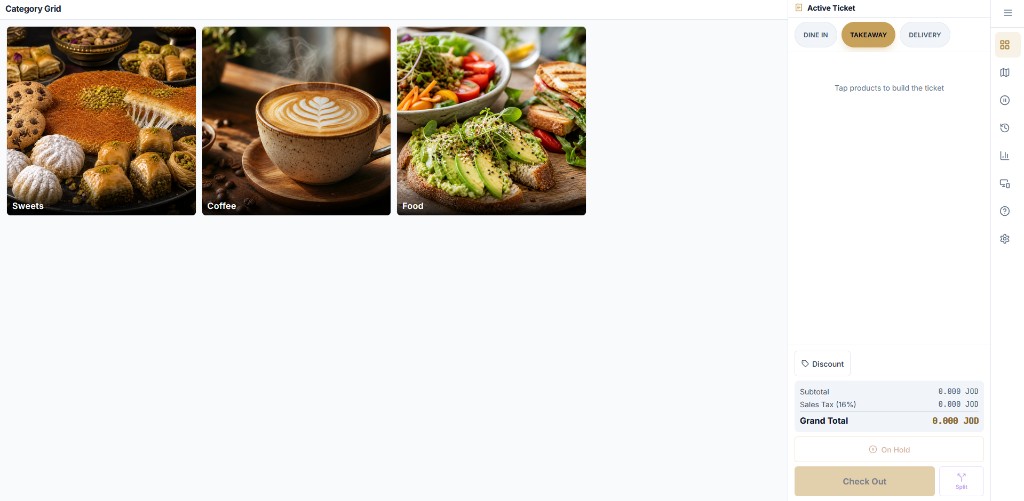
Cashier app on a Windows tablet — category grid on the left, the live ticket on the right.
The cashier app is what your staff touch all day, so it is built around a category grid, a live ticket and a small number of large buttons. New staff learn it in a shift.
Every sale is written to the device first and synced to the cloud second. If the internet drops mid-rush, cash sales, kitchen tickets and receipts keep going.
Worth knowing
Card payments are never marked paid while offline. Staff take cash or wait for the gateway to return.
Taking orders
Category grid with photos, sub-items and modifiers
Dine-in, takeaway and delivery on the same ticket screen, with channel-specific prices
Hold a ticket and come back to it; split a ticket between guests
Line and ticket discounts
Loyalty guest lookup and campaign discounts applied at checkout
Payment and receipts
Cash or card; card through PayTabs or Tap once you connect a gateway
16% sales tax and optional service charge calculated per store settings
Receipt print to a network thermal printer through the LAN print agent
Order-tracking QR on the receipt so guests can follow their order
Cash shift open/close with expected vs counted cash
Control
Each device is licensed to a store and branch from the Command Center
Voids and discounts are recorded with the staff member who did them, and can require a manager PIN
English and Arabic interface, switchable per device